
Jeep®
FCA US LLCLifestyle
4.73.38K Reviews
- Version
- 1.99.704
- Installs
- 500.00K
- Age Rating
- Everyone
Screenshots
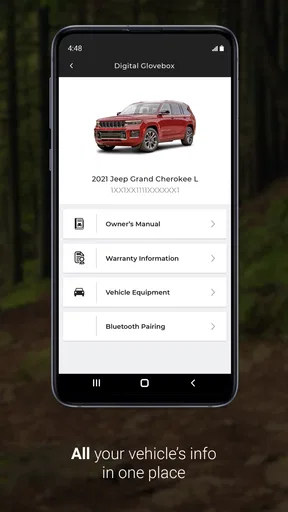
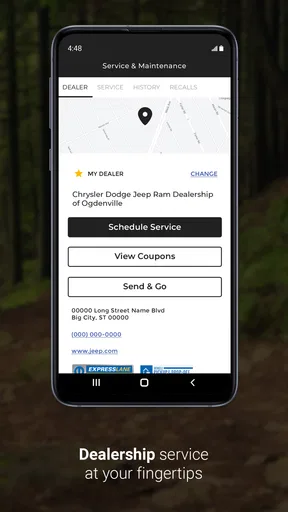
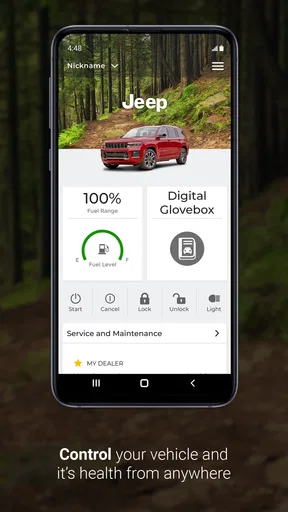
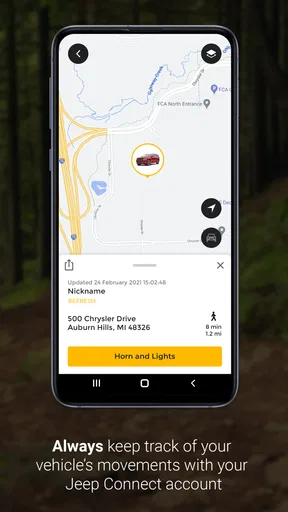
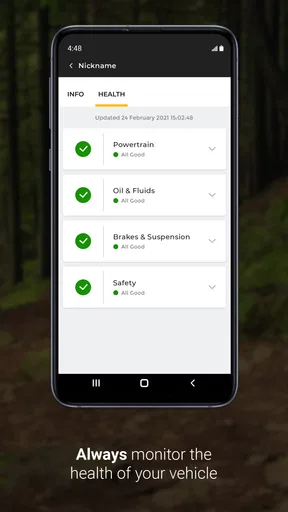
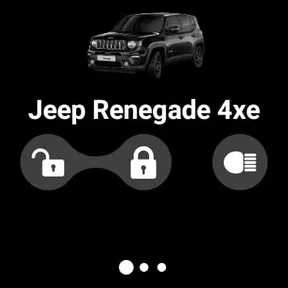
Our Review of Jeep®
 Analysis by Appyee
I spent time with Jeep® as a practical ownership companion rather than treating it like a general lifestyle app. That distinction matters. Its purpose is narrow: it is made for people who own or regularly drive a Jeep vehicle, and its value depends heavily on how much of your vehicle information, maintenance routine, and account activity you want to manage through one branded place.
The app comes from FCA US LLC and is free to download, with an Everyone age rating. It sits in the Lifestyle category, but I found it more useful to think of it as a digital glovebox and ownership reference point. It is not trying to replace every driving, navigation, insurance, or repair tool on your phone. Instead, it aims to make Jeep-related ownership tasks easier to reach.
That focused role is also where trust becomes important. A vehicle-owner app may involve personal account details, vehicle information, service-related records, and possibly location-sensitive moments depending on the tools a person chooses to use. I therefore judged it less by its branding and more by the choices it presents: whether the user can understand what is being requested, decide which functions to use, and avoid handing over more information than the task requires.
What using Jeep® feels like in everyday ownership
The first thing I noticed is that the app makes most sense when connected to a real ownership habit. If I am sitting in a parking lot trying to remember a maintenance detail, preparing for a service visit, or checking an ownership task, a dedicated Jeep space feels more direct than searching through unrelated apps and old emails. The experience is built around the vehicle relationship, not around generic car content.
That focus makes it especially suitable for a new owner who wants a single starting point. It can also help a household where more than one person drives the same Jeep, because a shared reference point is easier to remember than a mixture of paper documents, manufacturer pages, and notes in a phone. The useful question is not whether it does everything; it is whether it reduces small pieces of ownership friction often enough to justify keeping it installed.
In my experience, the best way to approach it is to begin with the least sensitive tasks. Look through the vehicle-oriented information first, learn where account settings and permissions are located, and only then decide whether additional connected functions are worth enabling. That order gives you a clearer sense of the app before you commit to broader access.
The public response suggests that many owners find the concept worthwhile. Jeep® has an average rating of 4.7 from around 18 thousand ratings, with more than 3 thousand written reviews. It has also passed half a million installs. Those figures do not prove that every owner will have a smooth experience, but they do show that the app has found a substantial audience rather than being an obscure experiment.
Who will get the most from it
I would recommend trying it first if you own a Jeep and prefer manufacturer-specific information over a collection of generic tools. It is also a sensible option for someone who frequently forgets service details, wants ownership material available on a phone, or likes having a recognizable place to begin when a vehicle question comes up.
It is less compelling for a person who does not own a Jeep, rarely interacts with vehicle information, or already has a carefully organized system that works well. A general notes app may be faster for recording reminders. A dedicated navigation service may be better for route planning. A mechanic’s own booking system may be more useful for scheduling work. The Jeep app earns its place when the Jeep-specific context is the main benefit.
There is another important limitation: a branded ownership app cannot remove the need to read the vehicle manual, follow safety instructions, or speak with a qualified technician. I would use it to organize and access ownership information, not as a substitute for professional diagnosis. If a warning light appears or the vehicle behaves dangerously, the app should not become an excuse to delay appropriate help.
Starting carefully instead of granting everything at once
One of my strongest practical recommendations is to treat setup as a review of choices, not as a race to reach the home screen. Read each request in context. Ask yourself why the app needs a particular piece of information, whether that function is central to your ownership routine, and whether you are comfortable keeping it active over time.
That approach is especially useful with vehicle apps because convenience can make a request feel automatically reasonable. A feature connected to a car may seem more trustworthy simply because the logo is familiar, but the sensible habit is still to inspect the permission prompt and the operating system controls. If a function is optional, I would leave it off until I have a clear reason to use it.
On Android, the operating system’s permission manager is the place to revisit access after setup. I would check it again after an update or after trying a new feature, because permissions can become easy to forget once the app is familiar. I would also disable access that no longer serves a purpose rather than allowing it indefinitely out of habit.
The app’s current version is 1.99.704, and it supports devices running Android 9 or later. That makes compatibility worth checking before installation, particularly if you use an older phone as a dedicated vehicle device. Keeping the operating system and the app current is also a sensible part of account hygiene, although updates should not be treated as a reason to skip reviewing choices.
Where data sensitivity appears in normal use
The most sensitive moments are not necessarily dramatic. They can happen while signing in, attaching a vehicle to an account, entering ownership details, or enabling a connected convenience that relates to where the vehicle is or how it is being used. I would slow down at each of those points and distinguish between information needed for the core ownership experience and information requested for an optional enhancement.
A realistic example is a service-day routine. I might open the app before leaving work, check the vehicle-related information I need, and then close it. In that situation, I would not automatically enable every available phone permission just because the app offers them. If a feature does not help with that specific task, keeping it disabled gives me a smaller and more understandable data footprint.
Another scenario is selling or transferring a vehicle. Before handing the Jeep to someone else, I would review the account, remove the vehicle from personal access where appropriate, and check the phone’s permissions. I would not assume that deleting the app alone handles every account relationship. The safer workflow is to look for visible account and vehicle controls first, then confirm that the old device is no longer the one being used for access.
Family use deserves similar care. If several people drive the same vehicle, decide who should manage the account and who only needs basic ownership information. Sharing a password casually may be convenient, but it weakens accountability. A better approach is to use the app’s visible account controls where available and keep personal sign-in details private.
Account control and the value of visible choices
I look for three things in an app like this: a clear way to manage the account, understandable permission prompts, and a straightforward path to stop using optional functions. Those controls matter more to me than a long feature list. A vehicle app becomes easier to trust when it lets the owner make decisions deliberately rather than hiding important choices behind a setup flow.
My advice is to record the email address or sign-in method used during setup in a secure place. That sounds mundane, but it prevents a common ownership problem: forgetting which account is linked to the vehicle and then creating duplicates. If the app is used across phones, keeping track of the original account can also make transitions less frustrating.
I would review the account after changing phones, selling the vehicle, or lending it for an extended period. Those events change the relationship between the person, the device, and the car. A quick review of signed-in devices, vehicle associations, and phone permissions is a worthwhile habit whenever ownership circumstances change.
Privacy choices are not only about refusing access. They are also about choosing the narrowest useful setup. If I need the app for reference material, I would start there. If I later discover a connected function that genuinely saves time, I can enable what that function needs and reassess afterward. This incremental method is more reliable than accepting every request and trying to remember the details months later.
How it compares with ordinary alternatives
Compared with a generic vehicle-maintenance app, Jeep® has the advantage of being tied to one manufacturer’s ownership context. That can make the information feel more relevant for a Jeep driver, while a general app may offer broader support across different makes. The trade-off is obvious: the Jeep app is not the natural choice for someone managing several unrelated vehicles.
Compared with a paper manual, the phone is easier to carry and search during an ordinary day. Paper still has an advantage when the phone battery is low, the signal is poor, or a driver wants a completely offline reference. I would keep essential vehicle documents available in more than one form rather than relying on a single app for every situation.
Compared with a general notes app, this app offers a more vehicle-centered starting point, but notes remain better for personal reminders, fuel observations, or a custom maintenance log that does not fit a manufacturer workflow. I see them as complementary rather than competing tools. The Jeep app can provide the context; notes can hold the owner’s own observations.
Compared with navigation or roadside services, the roles are different. A navigation app is usually built around routes and live travel decisions, while a manufacturer ownership app is more relevant to the relationship with the vehicle. If I am choosing a route, I would use the tool designed for navigation. If I am organizing Jeep ownership information, I would open this one.
Small habits that make the app more useful
First, I would install it before I urgently need it. Setting up an account in a calm moment is less frustrating than trying to do it beside a vehicle problem or immediately before a service appointment. It also gives me time to inspect permissions and account details without feeling pressured to accept everything.
Second, I would use a simple permission audit after the first week. Ask which functions I actually used, which permissions supported them, and which requests never became relevant. This is a practical way to keep convenience from turning into permanent, unexplained access.
Third, I would treat the app as a starting point for service conversations, not as the final authority on a mechanical issue. Before visiting a technician, I could gather the relevant vehicle information and write down symptoms separately. That produces a clearer handoff than relying on memory, while still leaving diagnosis to someone qualified.
Fourth, I would revisit the setup whenever another driver begins using the vehicle. A configuration that suits one owner may expose more information than another household member expects. Agreeing on account responsibility and avoiding informal password sharing is a small step that prevents confusion later.
Finally, I would keep expectations realistic after updates. A new version may change layout, prompts, or the path to a setting. I would take a minute to look through privacy and account controls again instead of assuming the previous configuration remains exactly as I remember it.
Where the experience may feel limiting
The app’s manufacturer focus is its greatest strength and its clearest boundary. Owners who want one universal dashboard for every car, repair shop, insurance policy, and travel service may find it too specialized. Even a well-designed brand app cannot replace tools built for those separate jobs.
There is also a mental cost to connected convenience. The more vehicle-related functions a person activates, the more important it becomes to remember which account is used, which phone is authorized, and which permissions remain enabled. Someone who dislikes account management may prefer a manual, a local note, or a simple service relationship instead.
I would also avoid judging the app purely by its rating. A 4.7 average is encouraging, but individual experiences can vary with the vehicle, phone, account situation, and chosen functions. The right test is whether it handles the specific ownership task that matters to you without demanding access you do not want to provide.
My cautious recommendation
Jeep® is worth trying for Jeep owners who want a dedicated digital ownership companion and are willing to manage it thoughtfully. The free price removes the main barrier to testing it, and the Everyone rating makes it broadly approachable. Its strongest case is practical: it puts Jeep-related ownership information closer to hand than a scattered collection of documents and generic apps.
I would not install it with the expectation that it will replace every automotive tool. I would begin with the core experience, inspect account and permission choices, and add connected functions only when their benefit is clear. That workflow gives the owner more control and makes it easier to understand what the app is doing.
My final view is positive but measured. The app has a clear audience, a credible ownership purpose, and enough adoption to show that the format works for many drivers. The best reason to use it is controlled convenience, not blind trust. If you own a Jeep and want a manufacturer-focused reference point, it is a sensible free addition. If you prefer minimal accounts, minimal permissions, or a single tool that covers every vehicle need, a simpler alternative may suit you better.
Verdict
Strengths of Jeep®
- Official Jeep branding with access to model details and specifications.
- Useful tools for finding nearby Jeep dealers and service locations.
- Convenient access to roadside assistance and customer support options.
- Vehicle-focused content helps owners stay informed about their Jeep.
- Clean interface makes core features easy to find and use.
Limitations of Jeep®
- Some features may require a compatible connected Jeep vehicle.
- Availability of services can vary by country and vehicle model.
- The app may request location and vehicle data for full functionality.
- Certain tools depend on an active Jeep account or subscription.
- Performance and feature support may differ between Android and iOS devices.
Other Releases by FCA US LLC
View All
RAM
Lifestyle4.7
Similar Picks in This Category
View All
SmartThings
Samsung Electronics Co., Ltd.4.6

Google Home
Google LLC4.0

Pinterest4.2

Astrotalk - Talk to Astrologer
Astrology & Horoscope4.7

My Verizon
Verizon Consumer Group4.5

Samsung Wallet (Samsung Pay)
Samsung Electronics Co., Ltd.4.1
Frequently Asked Questions
What is the Jeep® app used for?
The Jeep® app is designed to help owners stay connected with their vehicle and the Jeep brand. Depending on the model, region, and connected-services subscription, it may provide vehicle information, maintenance reminders, roadside assistance, dealership support, owner resources, and remote features such as locking, locating, or starting the vehicle. Available tools can vary considerably between vehicles.
Is the Jeep® app compatible with every Jeep vehicle?
No. Compatibility depends on the Jeep model, model year, trim level, country, and the connected technology installed in the vehicle. Some features require a compatible Uconnect system, an active connected-services plan, and a properly registered vehicle. Before downloading, check the official compatibility information and confirm that your Jeep identification details are accepted during account setup.
Does the Jeep® app require a subscription or additional fees?
The app itself may be free to download, but several connected features can require a trial period, paid subscription, or an eligible service plan. Basic owner information and support resources may remain available without a subscription, while remote commands, live vehicle status, or assistance services may be restricted. Pricing and included features differ by market and vehicle.
Can I use the Jeep® app to control my vehicle remotely?
On supported vehicles with active connected services, the app may allow selected remote actions, such as locking or unlocking doors, starting the engine, checking vehicle status, or locating the vehicle. These functions are not available on every Jeep and may require cellular coverage, correct account pairing, and safety conditions. Remote commands can also be delayed or unavailable during service interruptions.
Is the Jeep® app safe and reliable for vehicle information?
The Jeep® app is an official companion tool, but it should not replace the vehicle’s dashboard warnings, owner’s manual, or professional servicing. Information may depend on the last successful connection and can occasionally be delayed by weak mobile coverage or technical outages. Protect your login credentials, enable available security options, and contact roadside assistance directly during emergencies.
